# Share templates
> [!WARNING]
>
> **Preview
> --- templates**
>
>
> This feature is
>
> subject to the "Pre-GA Offerings Terms" in the General Service Terms section of the
> [Service Specific
> Terms](https://docs.cloud.google.com/terms/service-terms#1).
>
> Pre-GA features are available "as is" and might have limited support.
>
> For more information, see the
> [launch stage descriptions](https://cloud.google.com/products/#product-launch-stages).
You can share templates that you create with other projects or organizations in the Google Cloud console. These templates are categorized as *shared templates* and can be viewed in the **Shared templates** tab in the [Templates](https://console.cloud.google.com/integrations/templates) page. The following page describes how to share templates in Application Integration.
## Required role
To get the permissions that
you need to share templates,
ask your administrator to grant you the
[Application Integration Editor](https://docs.cloud.google.com/iam/docs/roles-permissions/integrations.md.txt#integrations.integrationEditor) (`roles/integrations.integrationEditor`) IAM role on the project.
For more information about granting roles, see [Manage access to projects, folders, and organizations](https://docs.cloud.google.com/iam/docs/granting-changing-revoking-access.md.txt).
This predefined role contains
the permissions required to share templates. To see the exact permissions that are
required, expand the **Required permissions** section:
#### Required permissions
The following permissions are required to share templates:
- `integrations.templates.share`
- `integrations.templates.unshare`
You might also be able to get
these permissions
with [custom roles](https://docs.cloud.google.com/iam/docs/creating-custom-roles.md.txt) or
other [predefined roles](https://docs.cloud.google.com/iam/docs/roles-overview.md.txt#predefined).
## Share templates
To share an existing template, do the following:
1. In the Google Cloud console, go to the **Application Integration** page.
[Go to Application Integration](https://console.cloud.google.com/integrations)
2. In the navigation menu, click **Templates** .
The **Templates** page appears listing all the templates (global, shared, and project) available in your Google Cloud project.
3. To share a shared template, click the **Shared templates** tab. To share a project template, click the **Project templates** tab.
4. Click the template that you want to share from the respective tab selected.
5. In the template details page, click group **Share** .
The **Share template** pane appears displaying any existing projects or organizations that the template is shared with.
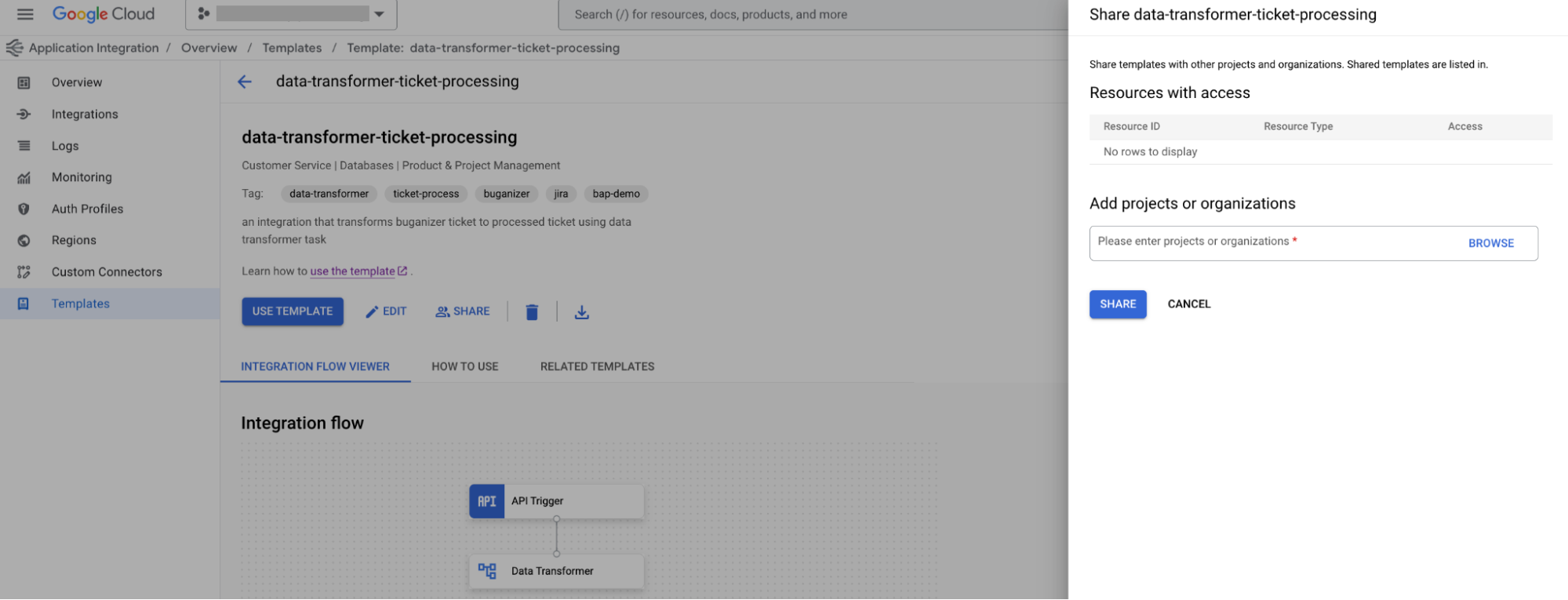

6. Under **Add projects or organizations** , perform one of the following actions:
- Click **Browse** and select the projects or organizations that you want to share the template with.
- Alternatively, you can enter the organization ID (organizations/{org-id}) or the project ID (projects/{project-id}) in the text box.
User can also alternatively add the organization or project. The format for adding organization is organizations/{org-id} \& for project projects/{project-id}
7. Under **Add projects or organizations** , click **Browse**.
8. Select the projects or organizations that you want to share the template with, and click **Select**.
9. Click **Share** .
The template is shared with the selected projects or organizations, and is automatically added to the **Shared templates** tab.
## What's next
- Learn how to use templates to create an integration, see [Create integrations from templates](https://docs.cloud.google.com/application-integration/docs/create-integration-from-templates.md.txt).
- Learn how to import and download templates, see [import and download templates](https://docs.cloud.google.com/application-integration/docs/import-download-templates.md.txt).
- Learn how to create templates, see [create templates](https://docs.cloud.google.com/application-integration/docs/create-templates.md.txt).
- Learn how to manage templates, see [manage templates](https://docs.cloud.google.com/application-integration/docs/manage-templates.md.txt).